
Most SEO tools give you keyword data but bury the on-page detail you actually need. The keyword density checker by Alaikas handles that gap directly: paste your content, get an instant breakdown of how often each keyword appears, where it shows up, and whether your density is helping or hurting your rankings. No login. No setup. Just the analysis.
This guide covers exactly how to use it, what the numbers mean, and where keyword density fits in your actual on-page SEO workflow.
What the Keyword Density Checker by Alaikas Actually Measures
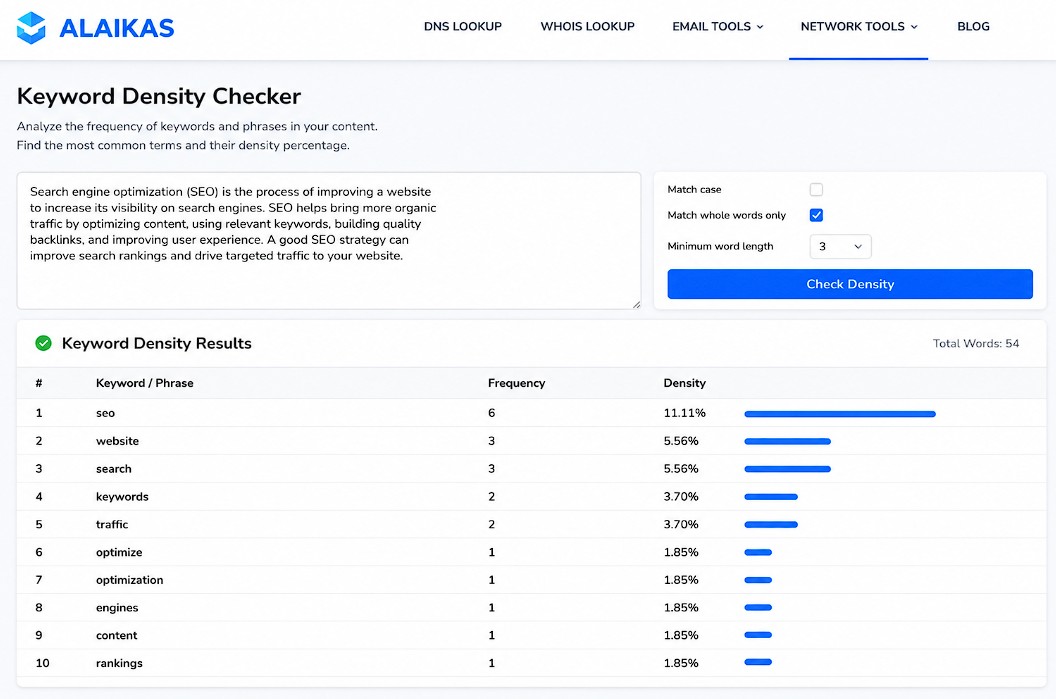
Keyword density is a percentage: how many times a keyword appears divided by the total word count, multiplied by 100. A 1,000-word article that uses a keyword 10 times has a 1% keyword density.
The keyword density checker by Alaikas calculates this for every term in your content, not just the one you nominate. That distinction matters. Most writers focus on their primary keyword and miss secondary terms that are either stuffed without realizing it or missing entirely.
The tool surfaces:
- Keyword frequency — the raw count for each term
- Keyword density percentage — frequency as a share of total word count
- Most repeated phrases — bigrams and trigrams that dominate your content
The phrase-level analysis is where most writers get caught. A page targeting “best project management software” might have a clean 1.2% density for that phrase, but a phrase like “project management” (a component two-gram) is appearing at 4.8% because it shows up in dozens of individual mentions. Google reads that. The checker flags it before it costs you.
How to Use the Keyword Density Checker by Alaikas Step by Step
Open the tool and paste your content into the text field. No formatting required — plain text works fine. If you paste from a CMS or Google Doc, the tool strips HTML and special characters automatically.
Step 1: Paste your content. Include the full page copy: title, meta description (if you want it included), headings, body text, and any alt text you write manually. The more complete your input, the more accurate the density picture.
Step 2: Run the analysis. The checker processes your text and returns a sorted table: highest-frequency terms first. Scan the top 10 results before doing anything else. If your primary keyword is not in the top three most frequent terms, your content may be under-optimized. If a completely unrelated term occupies the first or second slot, your content has a focus problem, not a density problem.
Step 3: Check phrase-level density. Switch the view to two-word and three-word phrases. This is where stuffing issues actually hide. A site audited after a Google manual action will often show a main keyword at 1.5%, within normal range, but a component phrase at 5% or 6% because the writer kept using partial matches throughout.
Step 4: Act on what you find. Anything over 3% for a single-word term or 2% for a phrase is worth reviewing. That is not a hard cutoff — the right density depends on the content type, word count, and competitive context. But these thresholds are a good trigger for a manual read-through.
Why Keyword Density Still Matters for On-Page SEO in 2026
Google has not published a recommended keyword density since its early algorithmic iterations, and “keyword density” as a standalone ranking factor stopped being directly measurable years ago. What remains true: pages that do not use their target keyword with enough consistency rank poorly for that keyword, and pages that use it excessively get filtered by the Panda-era quality filters still embedded in Google’s core algorithm.
The practical range that holds up across competitive verticals is 1% to 2% for your primary keyword on a standard blog post or landing page. Below 0.5% and you risk under-signaling topical relevance. Above 3% and you are in territory where Google’s quality evaluation systems flag the page for review.
These numbers shift based on content length. A 500-word page at 2% uses your keyword 10 times, which can sound natural. A 3,000-word page at 2% uses it 60 times, which almost certainly does not. The keyword density checker by Alaikas solves this by showing you actual frequency counts alongside percentages — so you can judge whether 20 appearances in a 2,000-word article reads naturally or not.
The more important signal is term co-occurrence. Pages that rank for competitive keywords typically use the keyword itself moderately and surround it with a consistent set of semantically related terms. The checker’s phrase-level output gives you a starting point for that audit: if your related terms are thin, you know what to add.
Common Keyword Density Mistakes the Alaikas Checker Catches
Over-optimization in subheadings. Writers who know headings carry SEO weight sometimes force the exact target keyword into every H2 and H3. The body text density looks normal, but the heading-to-keyword ratio is skewed. The checker surfaces this because heading text is included in the word count, so a keyword stuffed into six headings on a short article spikes the overall density.
Partial match accumulation. Targeting “email marketing software” and repeatedly using “email marketing” as a standalone phrase throughout the article is a common, unintentional stuffing pattern. The checker catches the two-gram density even when the full three-gram looks clean.
Invisible synonyms that are missing. If you are writing about “CRM software” and your content shows near-zero usage of “customer relationship management,” “sales pipeline,” “contact database,” or “lead tracking,” you have a thin semantic profile. The checker will not flag this as an error, but you will notice it when you scan the top phrases and see no related terms in the list.
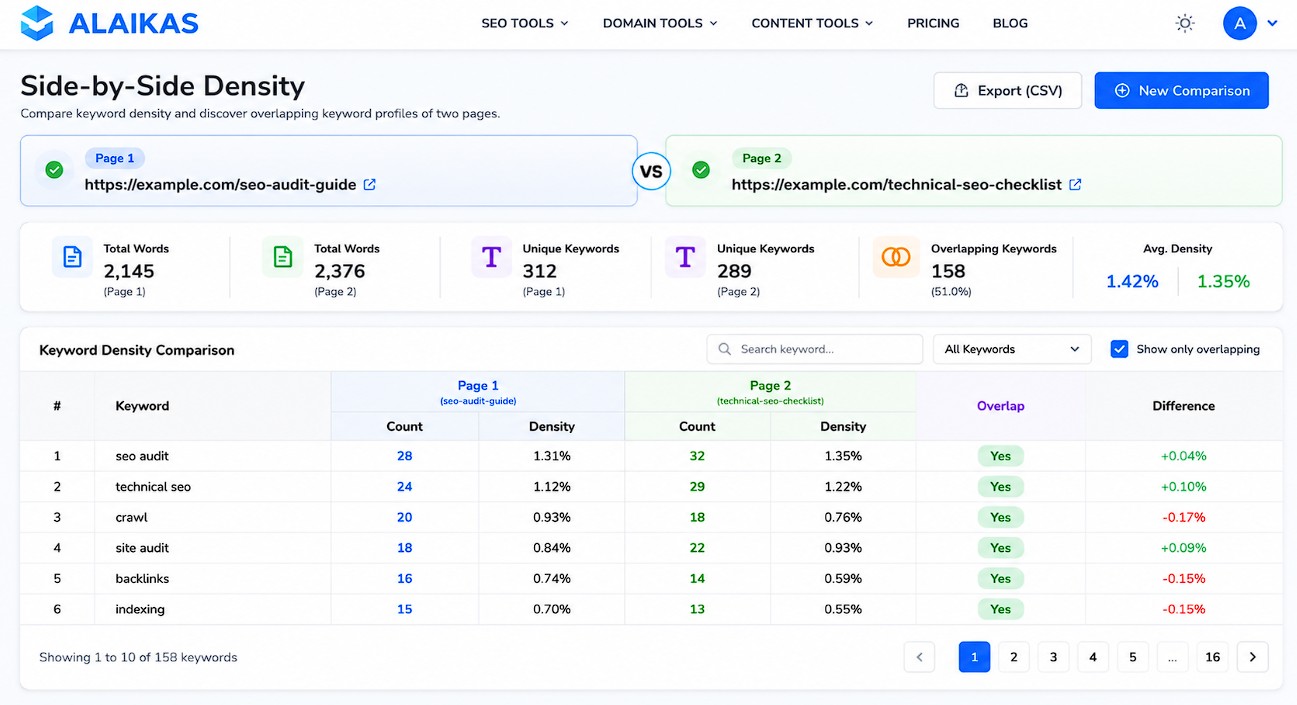
Duplicate content across multiple pages. If you run the checker on two service pages and the top keyword lists are nearly identical, you have a cannialization setup. SEO teams auditing large sites run multiple pages through tools like this before deciding which URL to consolidate or redirect. A bulk URL opener speeds this up considerably when you are pulling copy from 30 or 40 pages for comparison.
Keyword Density Checker by Alaikas vs. Other Free Tools
There are three other commonly used free keyword density checkers: Small SEO Tools, SEO Review Tools, and the built-in checker inside SEOquake. Here is how they compare on the metrics that matter for a real content audit.
Small SEO Tools: Returns a basic one-word frequency table with density percentages. No phrase-level analysis. Useful for a quick sanity check, limited for anything more precise.
SEO Review Tools: Includes phrase detection and a visual density gauge. The interface is slower and ad-heavy. Gets the job done but takes longer to load on large content blocks.
SEOquake: The browser extension shows keyword density for live pages. Good for competitor analysis. No paste-and-analyze option, so it does not work on drafts or staging content.
The keyword density checker by Alaikas sits between these. It loads fast, supports phrase-level density out of the box, and does not require an account or extension install. For a content team running weekly audits or an SEO freelancer checking client pages before publishing, that combination of speed and phrase analysis covers most use cases without paying for a premium tool.
Building a Keyword Density Audit Into Your SEO Workflow
The best time to check keyword density is twice: once before publishing and once when a page is underperforming in rankings.
Pre-publish audit: After writing, paste the final draft into the checker. Confirm your primary keyword is in the top 3 by frequency. Check phrase density for any two-gram above 2%. Read through the top 10 terms and ask whether that list accurately describes the page’s topic — if it does not, the content needs more semantic depth before it goes live.
Underperforming page audit: Pull the current live content (copy it directly from the page or use the page source). Run it through the checker. Then pull the top-ranking competitor for the same keyword, run their content through the same tool, and compare the top phrase lists side by side. This is not about copying their density — it is about identifying semantic gaps in your own content.
If you are auditing a large number of pages at once, the process of opening each URL individually gets slow fast. A bulk URL opener lets you paste a list of URLs and open them all in parallel tabs, so you can run the copy-paste audit across 20 or 30 pages in a fraction of the time it takes to do them sequentially. Pair that with a spreadsheet for tracking density findings, and you have a repeatable audit process that does not require a paid tool subscription.
The keyword density checker by Alaikas handles the analysis side. What you do with the output — which pages to rewrite, which to consolidate, which to leave alone — is the SEO judgment call that no tool can make for you.
Conclusion
The keyword density checker by Alaikas gives you a fast, phrase-level view of how your content uses its target terms, and that is enough to catch most of the on-page mistakes that hold rankings back. The number to watch is not just the primary keyword density — it is the phrase-level two-gram and three-gram breakdown that reveals accumulation patterns writers miss on a first pass.
Use it before publishing as a final content check. Use it again when a page is not ranking to compare your semantic profile against the pages that are. If you are doing this across a large site, combining the checker with a bulk URL opener cuts the per-page audit time significantly.
Frequently Asked Questions
What is the keyword density checker by Alaikas?
The keyword density checker by Alaikas is a free online tool that analyzes text content and returns a breakdown of how frequently each keyword and phrase appears, expressed as both a count and a percentage of total word count. It supports single-word and multi-word phrase analysis, making it useful for both basic on-page checks and deeper semantic audits.
What is a good keyword density percentage?
For most content types, a primary keyword density between 1% and 2% is a reasonable target. Below 0.5% and the page may under-signal topical relevance to search engines. Above 3% and you risk triggering quality filters that treat the page as over-optimized. These are guidelines, not hard rules — the right density depends on content length, content type, and how naturally the keyword reads in context.
Does keyword density still affect Google rankings?
Keyword density is not a direct ranking signal in Google’s current algorithm, but keyword usage patterns still influence rankings. Pages that use their target keyword consistently and surround it with semantically related terms tend to rank better than pages that use the keyword once or in an obviously stuffed pattern. The density checker helps you find both problems.
How is keyword density calculated?
Keyword density is calculated by dividing the number of times a keyword appears by the total word count of the content, then multiplying by 100. For example, if a keyword appears 15 times in a 1,500-word article, the density is 1%. Phrase density uses the same formula applied to two-word or three-word combinations.
Can I use the Alaikas checker on competitor content?
Yes. Copy the competitor’s page text, paste it into the checker, and run the analysis. This gives you a read on which terms they use most frequently, which related phrases appear, and where their semantic emphasis is. Comparing your own content’s density output against a top-ranking competitor’s is one of the more practical uses of the tool.
What is keyword stuffing and how does the checker detect it?
Keyword stuffing is the practice of using a keyword or phrase at a frequency that disrupts natural reading in order to try to manipulate rankings. The checker detects it by flagging single terms with density above 3% and phrases with density above 2%. More importantly, it shows you phrase-level accumulation, which is where unintentional stuffing most often occurs — especially with partial keyword matches embedded throughout a long article.
Should I check density for meta descriptions and titles too?
Meta titles and meta descriptions have very low word counts, so checking density inside them alone is not particularly useful. The more practical approach is to include your title and meta description in the full content paste when running the analysis, so they contribute to the overall density calculation the same way they appear in the content Google evaluates.
How is phrase density different from single-word density?
Single-word density counts every occurrence of a term regardless of context. Phrase density counts how often a specific two-word or three-word sequence appears together. Phrase-level analysis catches patterns that single-word counts miss: for example, a page targeting “content marketing strategy” might show a healthy 1.5% for the three-word phrase but a 4% density for the two-gram “content marketing” because that fragment appears throughout the article in different contexts.
What content types does the Alaikas checker work best for?
The tool works for any text-based content: blog posts, landing pages, product descriptions, service pages, and long-form guides. It is less useful for very short content (under 300 words), where density percentages are too volatile to be meaningful. For video scripts or social copy, the word count is typically too low for density analysis to produce reliable guidance.
How often should I run a keyword density check on my content?
Run it once before publishing any new piece of content and once when a published page is not ranking as expected. For a large site undergoing a content audit, check pages that have dropped in rankings over the past 90 days and compare their output against currently ranking pages. That cycle — new content before publish, underperforming content during an audit — covers most cases without making the check feel like a bureaucratic box-tick.
Is the Alaikas keyword density checker free?
Yes, the keyword density checker by Alaikas is free to use with no registration required. You paste your content, run the analysis, and get results immediately. There is no login wall, no trial limit, and no paywall for the phrase-level output.
Can I check density across multiple pages at once?
The Alaikas tool analyzes one content block per analysis. To audit multiple pages, you need to extract the copy from each page and run them individually. If you are working through a large list of URLs, a bulk URL opener lets you open all the pages simultaneously so you can copy content from each one without clicking through them one by one — a practical time-saver when an audit covers 20 or more pages.