Most backlink checkers either cost $99/month or throttle your results so hard that a free account is nearly useless. The backlink checker by Alaikas sits in a different category: it is a lightweight, no-login tool built for quick checks when you do not need a full Ahrefs report. This guide covers what the tool shows, where it fits in a real audit workflow, and exactly how to use it without wasting time on what it cannot do.
What the Backlink Checker by Alaikas Actually Shows You
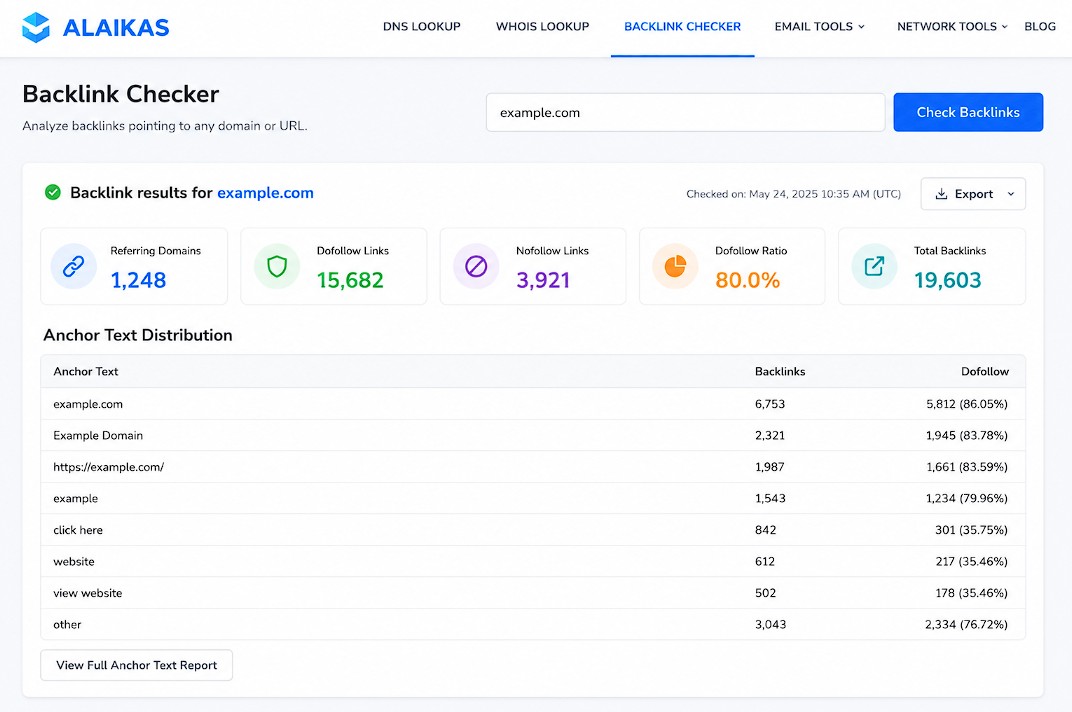
The backlink checker by Alaikas returns link data tied to a domain or URL you enter. The core output typically includes referring domains, the number of backlinks, and basic link attributes like dofollow/nofollow status. For a tool that requires no account creation, that is a solid starting point.
What separates it from generic free checkers is the interface speed. There is no account wall, no email gate, and no dashboard to navigate. You enter a URL, and results load. For a quick competitive check or a spot verification, that matters.
Here is what the tool covers well:
- Referring domain count: How many unique root domains link to the target
- Total backlink volume: The raw number of individual backlinks indexed
- Link type breakdown: Dofollow vs nofollow distribution
- Anchor text data: What text external sites use to link to the target
- Top linked pages: Which pages on the domain attract the most external links
Where it has limits: the index size is smaller than Ahrefs or Semrush. You will not get historical link velocity, toxic link scoring, or a disavow export. Think of this tool as triage, not deep analysis.
How to Use the Backlink Checker by Alaikas in a Real SEO Audit
The backlink checker by Alaikas fits best at the beginning of a link audit, not the end. Use it to get a fast read on a domain before deciding whether it warrants a full investigation in a paid tool.
Step 1: Enter the root domain, not a specific URL
If you want the full picture, enter example.com rather than https://example.com/blog/post/. Checking the root domain pulls links to every page on the site. Checking a specific URL shows only links pointing to that exact page. Both are useful for different reasons.
Step 2: Look at the dofollow ratio first
A healthy link profile leans dofollow. If more than 70% of a domain’s links are nofollow, that is worth investigating. It often means the domain relies on social media mentions, forum posts, or press release syndication rather than editorial links. Not necessarily bad, but worth understanding before you decide to pursue a link from that site.
Step 3: Scan anchor text for over-optimization
Anchor text diversity is a signal. If the same exact-match commercial keyword appears in 60% of referring anchor texts, that is a red flag for manual action or algorithmic penalty. The Alaikas tool surfaces this data in a quick table without having to export anything.
Step 4: Export or copy URLs for deeper review
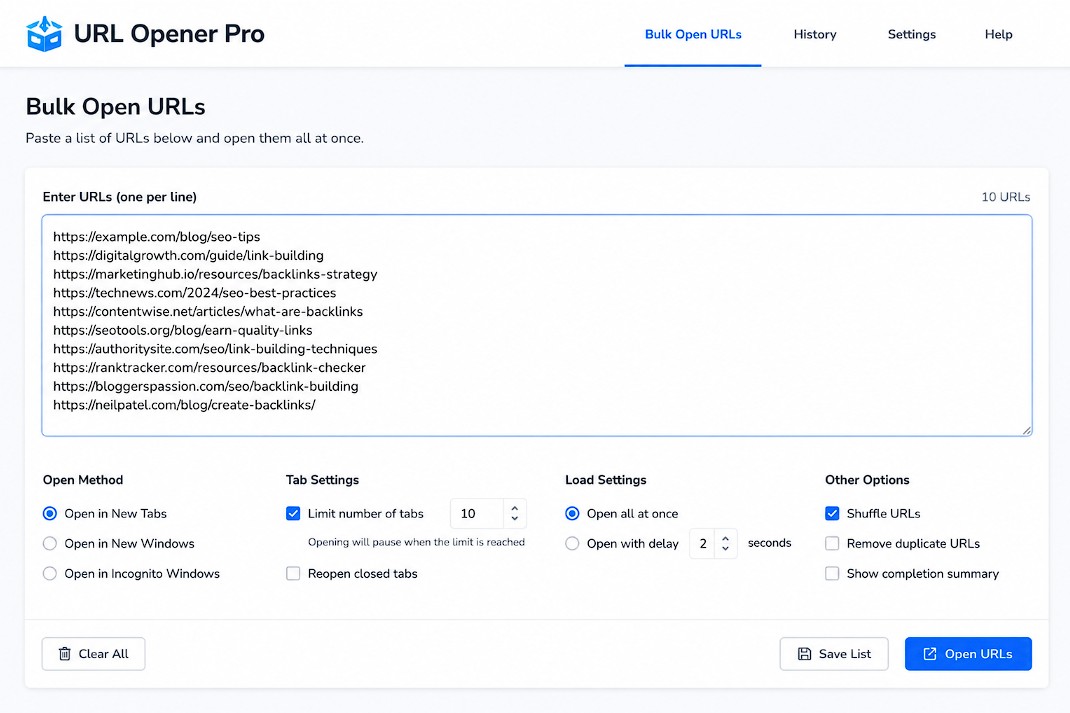
Once you have the referring domain list, you will want to spot-check the actual linking pages. That means opening each URL to confirm the link is live, visible, and contextually placed. When you have 30, 50, or 100 URLs to check, opening them one by one is a time sink. Paste the full list into URL Opener Pro and open them all in parallel tabs in one click. This cuts the manual review time from 20 minutes to about 90 seconds.
Backlink Checker by Alaikas vs Other Free Tools
The backlink checker by Alaikas is not the only free option. Here is how it stacks up against the most commonly used alternatives.
Alaikas vs Ahrefs Free Backlink Checker
Ahrefs offers a free backlink checker that shows the top 100 backlinks to any URL. The data quality is excellent since it pulls from Ahrefs’ full index. But the 100-link cap is a real ceiling, and the tool pushes hard toward account creation. Alaikas has no cap on results displayed and requires no login at all.
Pick Ahrefs free: When you need the highest-quality link data for a quick check and do not need bulk exports. Pick Alaikas: When you want zero friction, no email, and a fast domain-level read.
Alaikas vs Moz Link Explorer (Free Tier)
Moz gives 10 free queries per month on their Link Explorer. The data includes Domain Authority, spam score, and link type filters. For 10 queries a month, it works. Once you hit that limit, you are done until the next billing cycle. Alaikas has no query cap.
Alaikas vs SEMrush Backlink Analytics (Free Tier)
SEMrush’s free backlink tool is quite limited without a paid plan — you get 10 results per report. It is more of a teaser than a functional tool. Alaikas returns far more data per query.
Where Alaikas Genuinely Loses
Index size. Ahrefs crawls billions of pages and indexes links within days of them appearing. Alaikas, like most free standalone tools, works from a smaller crawl. If a link was placed last week, it may not be in the index yet. For fresh link tracking or competitive analysis at scale, a paid tool is the right call.
Common Use Cases for the Backlink Checker by Alaikas
The backlink checker by Alaikas works best for specific, bounded tasks. Here are the situations where it genuinely earns its place in an SEO workflow.
Quick competitor link profile scan before a pitch
If you are about to pitch a guest post to a site, spending $99/month on a full Ahrefs subscription to check one domain is not practical. Run the domain through Alaikas, confirm it has real referring domains (not just self-referential links), check the dofollow ratio, and decide in 60 seconds.
Verifying a purchased or earned link went live
You got the confirmation email. The link is supposedly live. Open Alaikas, search the linking domain, and check whether your target URL appears in the link list. Small index lag aside, this is fast and free.
Auditing a new client’s domain before an engagement
Before you commit to an SEO retainer, you need to know whether the site has a toxic link problem. Run it through Alaikas, look at the referring domain distribution, check for patterns in anchor text, and flag anything that warrants a deeper pull in Ahrefs or SEMrush. This is a triage step, not a complete audit.
Teaching link analysis to a junior SEO
Paid tools have steep learning curves. Alaikas shows the core concepts (referring domains, anchor text, link types) without layers of dashboards. It is a clean starting point for someone learning what a link profile actually means.
How to Get the Most Out of the Backlink Checker by Alaikas
The backlink checker by Alaikas rewards users who know how to read what it shows. Raw numbers without context lead to bad decisions.
Treat referring domain count as the primary metric
One site can send you 400 links from 400 different pages. That is still one referring domain. A domain with 50 referring domains is almost always stronger than one with 400 backlinks from a single source. Always look at unique referring domains first.
Cross-reference against traffic data
A referring domain with zero organic traffic is worth very little, regardless of how many links it sends. If you have access to Semrush or Ahrefs even on a limited plan, pull organic traffic estimates for the top referring domains. Links from low-traffic sites with no real audience are unlikely to move the needle.
Use it for gap analysis, not just your own domain
Run 3 to 5 competitors through Alaikas. Note which referring domains appear in multiple competitor profiles. A domain linking to 3 of your competitors but not to you is a qualified prospect. They clearly link out in your niche. That is your list of first-contact outreach targets.
Combine Alaikas output with URL Opener Pro for verification speed
Once you have a list of URLs to check manually, bulk-open them in parallel rather than clicking through one at a time. The URL Opener Pro Chrome extension lets you paste the full list directly from the toolbar without opening a new tab first.
Conclusion
The backlink checker by Alaikas is not trying to replace Ahrefs. It fills a specific gap: fast, free, no-login link analysis for everyday triage tasks. Used correctly, it handles competitor scans, link verification, and client pre-qualification without spending a dollar or creating an account. Its limits are real and worth knowing (smaller index, no historical data, no disavow export), but for the use cases it targets, it is genuinely useful. Start with Alaikas for the quick read, then bring in a paid tool only when the depth is actually needed.
Frequently Asked Questions
What is the backlink checker by Alaikas?
The backlink checker by Alaikas is a free online tool that shows the backlink profile for any domain or URL. It returns data on referring domains, total backlinks, dofollow/nofollow ratio, anchor text distribution, and top linked pages. No account creation or login is required to use it.
Is the backlink checker by Alaikas completely free?
Yes. The tool is free to use without any registration, email submission, or paid upgrade. You enter a domain or URL and receive backlink data immediately. There is no query cap advertised for standard use, though heavy automated use may have limits.
How accurate is the data in the Alaikas backlink checker?
The data reflects the tool’s crawl index, which is smaller than commercial tools like Ahrefs or Semrush. For well-established domains with a long link history, the data is reasonably representative. For very new links (placed within the past few days or weeks), there may be indexing lag before they appear in results.
Can I use the Alaikas backlink checker for competitor research?
Yes, and this is one of its strongest use cases. You can enter any competitor’s domain to see their referring domain count, anchor text patterns, and top linked pages. Comparing 3 to 5 competitors helps identify link gap opportunities: sites that link to your competitors but not to you.
Does the Alaikas tool show toxic or spammy backlinks?
The tool shows backlink data including dofollow/nofollow status and anchor text, but it does not include a spam score or toxicity rating. To identify potentially harmful links, you would need to review the referring domains manually or cross-reference against a paid tool like Semrush’s Backlink Audit, which includes a toxicity score built on a 0-100 scale.
How is the backlink checker by Alaikas different from Ahrefs’ free backlink checker?
Ahrefs’ free backlink checker caps results at the top 100 backlinks and is designed to drive sign-ups to their paid platform. The Alaikas tool has no visible cap on results and requires no account. Ahrefs has a significantly larger and more frequently updated index, so for precision research, Ahrefs wins on data quality. For quick, frictionless checks, Alaikas wins on convenience.
Can I check a specific page’s backlinks rather than an entire domain?
Yes. Enter the exact URL of the page you want to check (for example, https://example.com/services/) instead of just the root domain. The results will show backlinks pointing to that specific page only. To see links across the entire domain, use the root domain format without a subdirectory path.
How many backlinks is considered healthy for a domain?
There is no universal number. A site with 50 high-quality referring domains from relevant, traffic-driving websites will outrank a site with 5,000 backlinks from 10 spammy sources. The quality, relevance, and authority of referring domains matters far more than the raw count. Focus on referring domain diversity and the organic traffic of linking sites over total backlink volume.
How do I verify that a backlink is actually live on a page?
Run the domain through Alaikas to find the referring page URL, then open that page and check manually. When you have a long list of URLs to verify, paste them all into URL Opener Pro and open them simultaneously in parallel tabs. This reduces a 30-minute manual check to a few minutes of quick visual scanning.
Does the backlink checker by Alaikas work for subdomains?
You can enter a subdomain (for example, blog.example.com) and the tool will return backlinks pointing to that subdomain specifically. Links to the root domain and other subdomains will not be included unless you check them separately. This is useful for auditing a blog section that runs on a subdomain independently from the main marketing site.
Should I use Alaikas alone for a full backlink audit?
No. The Alaikas tool works well for initial triage, competitive spot checks, and quick link verification. For a complete link audit that includes link velocity over time, toxic link identification, disavow file creation, and historical data, you need a paid tool like Ahrefs, Semrush, or Moz Pro. Use Alaikas to decide whether a full audit is necessary, then bring in the heavier tool when it is.
Is the Alaikas backlink checker good for local SEO link building?
It works for the initial research phase. If you want to see what links local competitors have, Alaikas gives you a fast view of their referring domains. For local SEO specifically, the most valuable links tend to come from local directories, chambers of commerce, local news sites, and niche-specific sites, all of which you can identify through a competitor check.