A single broken link costs you more than one ranking. When Googlebot follows a link and hits a 404, it wastes crawl budget, drops the linking page’s authority, and signals a poorly maintained site. The broken links finder by Alaikas is a free Chrome extension built to catch these dead links fast, directly in your browser, without crawling your entire site from a separate tool. This guide walks you through exactly what it detects, how to use it inside a real SEO audit, and what to do with the results once you have them.
What the Broken Links Finder by Alaikas Actually Does
The broken links finder by Alaikas is a Chrome extension that scans the currently open web page and highlights every hyperlink that returns a non-200 HTTP status code. It checks links in real time as you browse, color-coding them so you can see at a glance which ones are live, which return 404s, and which are redirecting.
What it checks and flags
When you activate the extension on any page, it fires HEAD requests to every linked URL on that page and reads the HTTP response. Links returning 404 (Not Found), 410 (Gone), 403 (Forbidden), and 500-level server errors are flagged visually on the page itself. Redirecting links (301, 302) are also marked separately so you can distinguish a clean redirect from a broken destination.
This matters because many broken link audits treat only 404s as problems. In practice, a 302 redirect to an irrelevant page or a 410 with no replacement are just as damaging to link equity and user experience.
What it does not replace
The extension is page-level, not site-wide. It works on whatever page you have open. It will not crawl your full site the way Screaming Frog or Sitebulb does. For a deep crawl of 10,000 URLs, you still need a crawler. Where Alaikas’ tool earns its place is in fast page-level checks: verifying a newly published post, spot-checking a competitor’s resource page during link prospecting, or confirming your internal links are clean before a page goes live.
How to Install and Run the Broken Links Finder by Alaikas
Getting the broken links finder by Alaikas running takes under two minutes. It is available in the Chrome Web Store and requires no account, no API key, and no configuration.
Installation steps
- Open the Chrome Web Store and search for “Broken Links Finder Alaikas” or search the direct extension name.
- Click “Add to Chrome” and confirm the permissions. The extension needs access to the active tab to read link elements and fire HTTP requests.
- A small icon will appear in your Chrome toolbar. Pin it for easy access.
Running a check on any page
Navigate to any page you want to audit. Click the extension icon. It begins scanning immediately, sending requests to every outgoing and internal link it finds in the page’s HTML. Depending on how many links the page contains and how fast those external servers respond, a full check on a typical 50-link page takes 10 to 30 seconds.
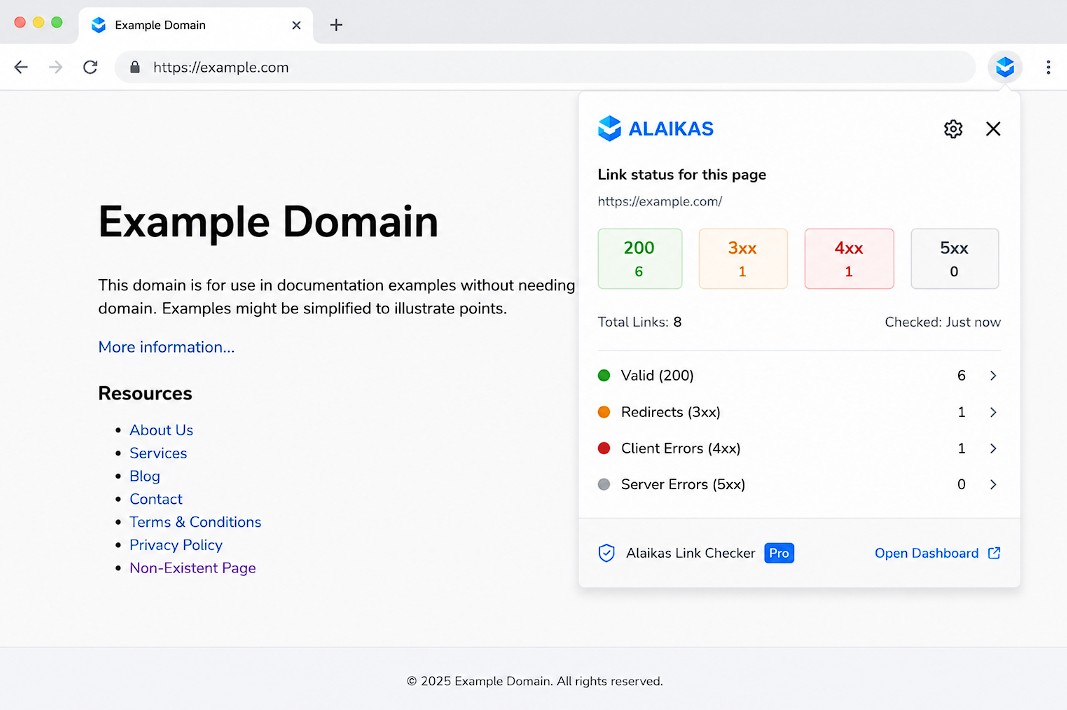
Results render directly on the page, with broken links highlighted in red and redirects marked in a distinct color. You can also open the extension popup to see a summary count of total links checked, broken links found, and redirect chains flagged.
Common setup mistake
The most frequent issue is the extension flagging legitimate links as broken because the target server blocks HEAD requests. Some servers return 403 or 405 only in response to HEAD requests but serve the page fine on a GET request. If you see a high volume of 403 flags on a well-maintained site, verify those manually before treating them as real broken links.
Using the Broken Links Finder by Alaikas Inside a Real SEO Audit
A standalone link check tells you something is broken. A structured audit tells you what to do about it. Here is how the broken links finder by Alaikas fits into the kind of audit that actually moves rankings.
Step 1: Run a full site crawl first
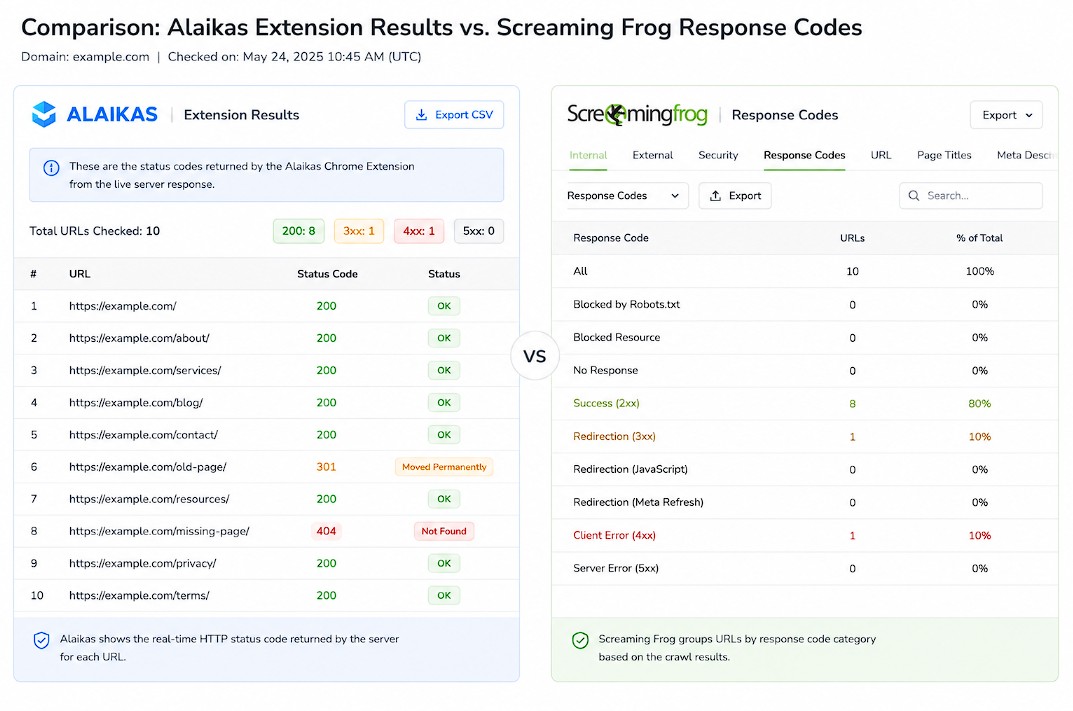
Before using the extension, run Screaming Frog or Sitebulb on your site. In Screaming Frog, go to Response Codes, filter for 4XX, and export the full URL list. This gives you a crawl-level view of every broken internal link across your entire site. For an average 5,000-page site, this typically surfaces between 20 and 80 broken internal links that most site owners have no idea exist.
Step 2: Use Alaikas for page-level verification and spot-checks
Once you have the Screaming Frog export, use the Alaikas extension to verify specific high-priority pages. Open your most linked-to pages (check these in Ahrefs under Best by Links) and run the extension. This confirms whether the crawl results are accurate and catches any linking errors Screaming Frog may have missed due to JavaScript-rendered links.
For competitor research, navigate to a competitor’s resource page or a high-DR link target during outreach and run the extension. Any 404s you find are link reclamation opportunities: pages where your competitor once linked out but the destination is now dead. You can create equivalent content and pitch the replacement.
Step 3: Open all flagged URLs in one batch
After identifying broken links across multiple pages, you will have a list of URLs to investigate, verify, and fix. Opening them one by one is slow. Paste the list into URL Opener Pro and open all of them at once in parallel tabs. For a set of 30 to 50 flagged URLs, this saves 10 to 15 minutes of manual clicking and keeps your audit moving.
Step 4: Categorize and prioritize fixes
Not every broken link requires the same fix. Use this decision tree:
- Internal 404: Update the link to the correct destination or the closest redirect target. If no replacement exists, remove the link.
- External 404 pointing outward: Replace with a better source or remove. Do not link out to dead pages.
- External 404 pointing inward (lost backlinks): Submit a reconsideration or reach out to the linking domain. Check your Ahrefs “Lost Backlinks” report to cross-reference.
- 301 redirect chain: Evaluate whether you can update the link to point directly to the final destination. Chains of 3 or more redirects bleed PageRank.
What Broken Links Actually Cost You in Search Rankings
The SEO community often treats broken links as a housekeeping issue rather than a ranking factor. That framing misses how Google’s crawler and ranking signals actually work.
Crawl budget waste
Google allocates a crawl budget to every site based on crawl demand and site health. When Googlebot follows internal links and hits 404 responses, it spends crawl budget on pages that return no indexable content. For large sites with tens of thousands of pages, this matters. Google’s own documentation on crawl budget management notes that improving site health (which includes fixing 4XX errors) helps crawlers discover and index content more efficiently.
PageRank loss through broken internal links
Internal links pass PageRank between pages. A broken internal link is a dead end: the PageRank that would have flowed to that destination is effectively lost. If a high-authority page on your site links to a broken internal URL, you are wasting the authority that page could be distributing to live, ranking content.
A 2023 analysis by Ahrefs of 1 billion pages found that 55.5% of pages have no backlinks at all. For pages that do earn links, broken internal links reduce how effectively that authority flows through the site. Fixing them is one of the highest-leverage technical fixes available because it costs nothing and has immediate effect on authority distribution.
User experience signals
Google uses behavioral signals (time on page, pogo-sticking, engagement) as ranking inputs. A user who clicks an internal link and hits a 404 leaves immediately. That exit signal, repeated across many users, tells Google the page does not serve user intent well. The fix is straightforward: the broken links finder by Alaikas surfaces these exactly where they live so you can act on them before Google does.
Broken Links Finder by Alaikas vs. Other Free Tools
Several free tools claim to check broken links. The Alaikas extension has specific strengths and specific limits worth understanding before you decide where it fits in your stack.
Alaikas vs. W3C Link Checker
The W3C Link Checker is server-side: you submit a URL and it crawls the page from W3C’s servers. It is thorough but slow on pages with many external links and does not render inside your browser. Alaikas runs client-side in Chrome, which means it inherits your browser’s session cookies. This matters when you need to check authenticated pages, staging environments behind HTTP auth, or pages that are only accessible when logged in. W3C cannot access those. Alaikas can.
Alaikas vs. Screaming Frog’s broken link report
Screaming Frog’s free version caps at 500 URLs per crawl. Its broken link report is generated after a full crawl, not in real time. It is the right tool for site-wide audits. Alaikas is the right tool for instant, page-level checks during active work: writing a post, reviewing a client’s page, or spot-checking a newly published URL.
Alaikas vs. Ahrefs’ broken backlinks report
Ahrefs identifies broken backlinks pointing to your site (external links that 404 at your end). Alaikas checks links going out from the page you are on. These are complementary, not competing. Use Ahrefs for inbound link health; use Alaikas for outbound and internal link health on any given page.
Common Mistakes When Using the Broken Links Finder by Alaikas
Getting accurate results from any link checker depends on understanding its limitations. Here are the mistakes most users make that lead to false positives, missed errors, or wasted time.
Treating every red flag as a confirmed broken link
Alaikas sends HEAD requests, and some servers reject HEAD requests by default (returning 403 or 405) while responding normally to GET requests from real browsers. Before you report a link as broken, right-click it and open it in a new tab. If the page loads, the server is simply blocking the request method, not the content. Mark it as a false positive and move on.
Ignoring redirecting links
The extension flags 301 and 302 redirects separately from hard 404s. Many users focus only on the 404 count and dismiss redirects. But a 302 redirect loop, a redirect chain leading to a 404, or a 301 pointing to an irrelevant page after a content migration are real SEO problems. Review the redirect flags, not just the 404s.
Not re-running after publishing new content
Internal linking errors often happen at the moment of publishing. A writer links to a post URL that has not been published yet, or an editor changes the slug of a published post without updating internal links. Running the Alaikas extension on newly published pages within 24 hours of going live catches these immediately, before Google crawls them.
Skipping high-link-count pages
Pages with sidebar navigation, footer links, or mega-menus contain 50 to 150 links each. These pages generate the most broken link risk because so many links change so often. Prioritize running the extension on your homepage, category pages, and any page with site-wide navigation. One broken link in a global footer could affect every page on your site.
Frequently Asked Questions
What is the broken links finder by Alaikas?
The broken links finder by Alaikas is a free Chrome browser extension that scans any web page you visit and identifies links that return error responses, including 404 Not Found, 410 Gone, 403 Forbidden, and 5XX server errors. It also flags redirecting links so you can review redirect chains. Results appear directly on the page in real time, color-coded by status.
Is the broken links finder by Alaikas free to use?
Yes, the extension is free. It is available in the Chrome Web Store and requires no account, subscription, or API key. You install it, click the icon on any page, and it runs immediately.
Does the Alaikas broken link checker work on JavaScript-rendered pages?
Because it runs as a Chrome extension inside an active browser tab, it can check links that are rendered by JavaScript, as long as those links appear in the DOM after the page loads. This gives it an advantage over server-side tools that only parse raw HTML and miss dynamically inserted links.
Can I use the broken links finder by Alaikas on pages behind a login?
Yes. Since it operates within your active Chrome session, it inherits your login cookies. You can run it on authenticated admin pages, staging environments, or any page you can access while logged in. Server-side tools like the W3C Link Checker cannot access these.
How does Alaikas compare to Screaming Frog for finding broken links?
Screaming Frog is a site-wide crawler that generates a broken link report after a full crawl. It is better for complete site audits. Alaikas checks one page at a time in real time, directly in your browser. Use Screaming Frog for depth and full coverage; use Alaikas for speed and spot-checking during active work.
What HTTP status codes does the Alaikas broken link finder flag?
It flags 4XX errors (most commonly 404 and 410, sometimes 403), 5XX server errors, and redirect responses (301, 302). Green typically indicates a healthy 200 OK response. The extension’s color system lets you distinguish broken links from redirecting ones at a glance.
Does finding and fixing broken links improve Google rankings?
Fixing broken internal links improves how PageRank flows through your site, reduces crawl budget waste, and removes a poor user experience signal (404 exits). It does not produce instant ranking jumps, but it is a foundational technical fix. Sites with high volumes of 4XX errors on important pages consistently underperform in crawl coverage compared to sites with clean link health.
Can the Alaikas extension check external links leaving my site?
Yes. It checks all outgoing links on the page, including external URLs pointing to other domains. This is useful for content audits where you want to verify that your citations and resource links still point to live pages.
What should I do after identifying broken links with the Alaikas tool?
Categorize the errors first: internal 404s need a link update or removal; broken outbound links need a better replacement source; broken backlinks (inbound links pointing to your 404s) should be addressed with redirects or outreach. For large sets of flagged URLs, paste them into a bulk URL opener to verify each one quickly without opening them one at a time.
How often should I run broken link checks on my site?
For active sites that publish frequently, run a page-level check on every new post before publishing and a full site crawl via Screaming Frog monthly. For sites with slower publishing cadences, a quarterly crawl combined with spot-checking high-traffic pages monthly is adequate. Navigation-heavy pages (homepage, category pages) should be checked after any major content or template change.
Is there a limit to how many links the Alaikas extension can check on one page?
The extension does not publish a hard cap, but performance can slow on pages with several hundred links due to the volume of concurrent HTTP requests. Most standard web pages (under 150 links) process cleanly and quickly. Pages with very large navigation menus or extensive footer link structures may take longer to complete.
Does the Alaikas broken links finder work on Firefox or Edge?
The extension is primarily built for Chrome. It may be available on Chromium-based browsers like Microsoft Edge through the Chrome Web Store compatibility, but Firefox uses a different extension system. Verify availability in each browser’s specific extension store before assuming compatibility.
What is the difference between a broken link and a redirect?
A broken link points to a URL that returns an error response, most commonly 404 or 410, meaning the page no longer exists. A redirect points to a URL that returns a 3XX code and forwards the user to a different destination. Redirects are not always problematic, but redirect chains (multiple consecutive redirects) and redirects pointing to unrelated pages are worth reviewing and fixing.